



Introduction#
Purpose#
cuNLS is a library for solving nonlinear least-squares problems on the GPU. It is designed around batched factor evaluation, sparse Jacobian assembly, and sparse linear solvers tailored for large scale minimization problems.
cuNLS is used primarily from Python through pycunls, a package that exposes the full library through CuPy-based GPU arrays (see Installation and Quick Start). For advanced extensibility, pycunls integrates with NVIDIA Warp to let users author custom factor and state kernels in Python (see Tutorial).
The same functionality is available as a native C++/CUDA API
(libcunls), for applications written in C++ or for custom factors
implemented directly as CUDA kernels (see C++ Installation,
C++ Quick Start and C++ Tutorial).
Nonlinear least-squares problems#
At a high level, cuNLS solves optimization problems of the form:
where:
\(x\) is the optimization variable (often living on a manifold),
\(f_i(x)\) are residual/error functions,
\(\rho_i(\cdot)\) are optional robust loss functions,
\(\left\|v\right\|^2_{\Sigma} = v^T \Sigma^{-1} v\) is the Mahalanobis norm.
Using a square-root information matrix \(R_i\) such that \(\Sigma_i^{-1} = R_i^T R_i\), each term can be rewritten as:
This is exactly why cuNLS has a dedicated InformationFactorBatch: it applies
this whitening step directly to residuals and Jacobians. WeightedFactorBatch
does the same for scalar weighting. In C++, the template
InformationFactorBatch<T> inherits T::sized_layout (the same
SizedFactorBatch as the inner batch), and so does
WeightedFactorBatch<T>.
To solve the nonlinear problem, cuNLS linearizes around the current estimate \(x_0\):
Stacks all blocks into a global Jacobian \(J\) and vector \(b\), then solves a sparse linearized system (Gauss-Newton / Levenberg-Marquardt):
with normal equations:
and updates:
where \(\oplus\) is the manifold plus operation implemented by state batches (for Euclidean states, this reduces to simple addition).
Factor Graphs#
A common way to set up nonlinear least-squares problems is to create a factor graph: a graph where nodes represent variables and edges represent constraints between them.
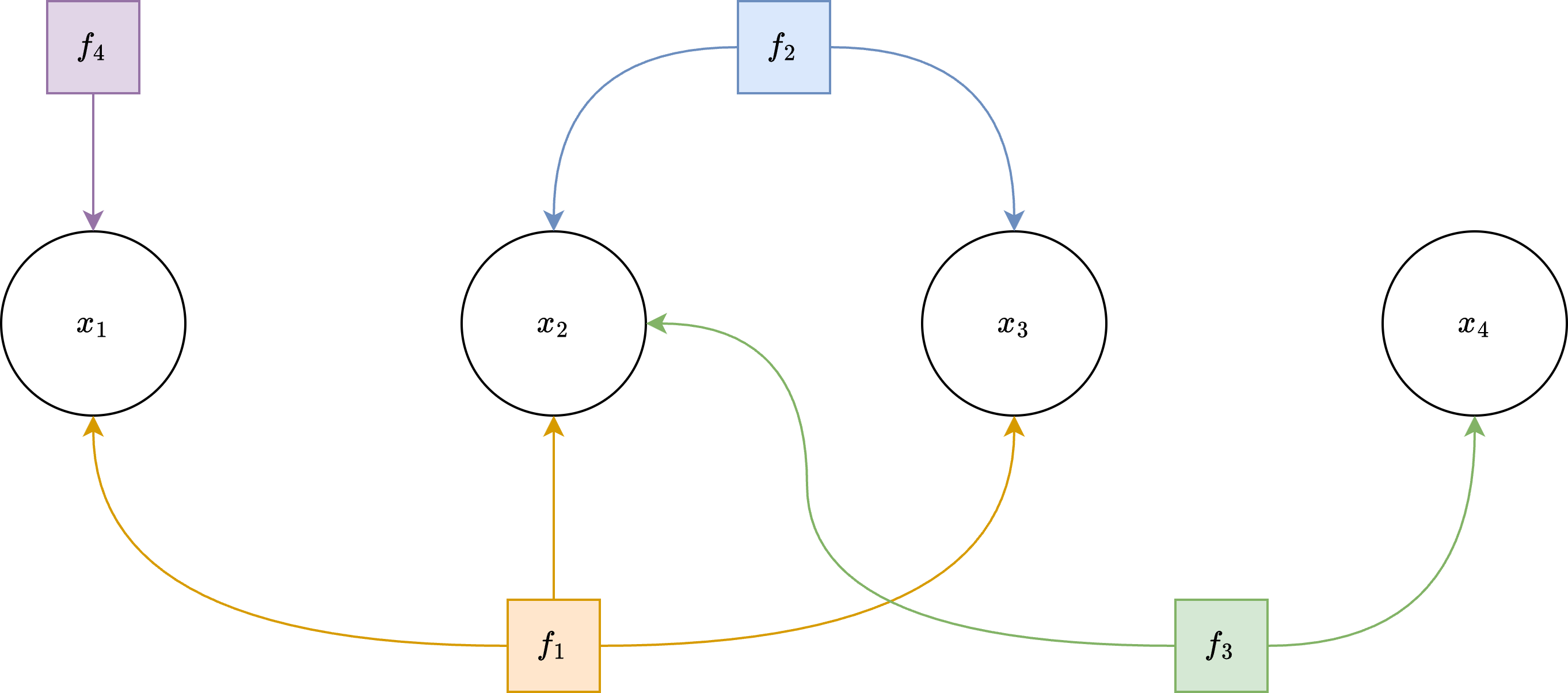
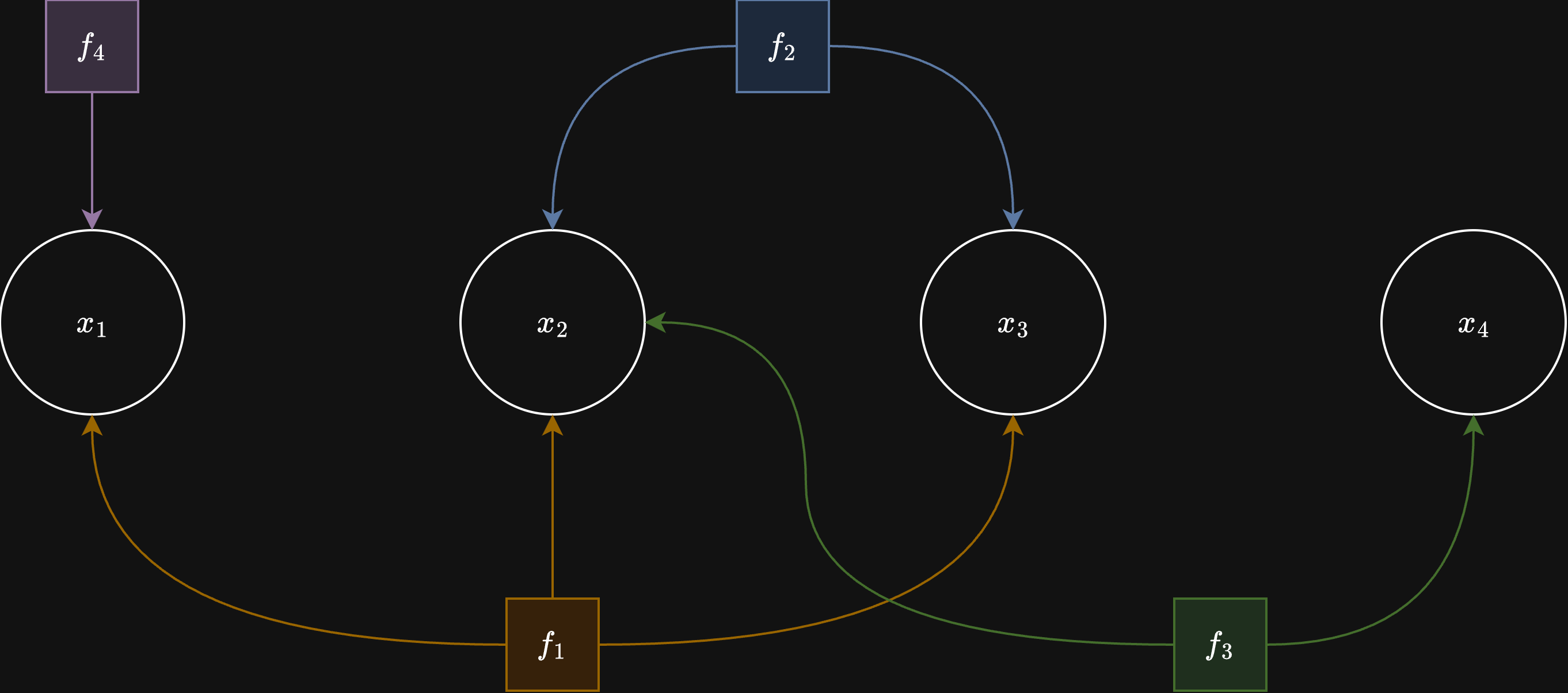
Example factor-graph structure used to represent sparse nonlinear least-squares problems.
The constraints between variables are called factors, which are nonlinear functions representing mean error. Each factor is also associated with a covariance matrix. Together the mean and the covariance represent multivariate normal distribution for a given factor.
This way factor graph is a probabilistic graphical model, which represents a joint probability distribution of all factors
and the MAP estimate is:
For Gaussian-like factors:
maximizing the posterior is equivalent to minimizing the sum of squared (and optionally robustified) residuals.
cuNLS allows setting up variables and factors in batches for higher GPU utilization.
A FactorBatch is a collection of same type factors that are connected to a list of StateBatch objects —
collections of same type variables.
The Problem is a collection of FactorBatch objects and connected StateBatch objects, that together form the Factor Graph.
Core concepts#
State batches store optimization variables on manifolds (for example,
SE3StateBatchfor rigid transforms,VectorStateBatch3for Euclidean 3D vectors; in C++,VectorStateBatch<Dim>).Factor batches compute residuals and Jacobians in parallel for many observations.
Problems connect factors to states via device pointers (
state_device_ptr(i); C++StateDevicePtr(i)).Minimizers (
GaussNewtonMinimizer,LevenbergMarquardtMinimizer) solve for state updates (minimize; C++Minimize).Loss functions robustify residuals to reduce outlier influence.
RANSAC minimizers (
RansacGaussNewtonMinimizer,RansacLevenbergMarquardtMinimizer) solve the same problems when many measurements are gross outliers, and return the inlier set (Robust Estimation with RANSAC).
Capacity and active count#
Important
Every factor batch and state batch has two sizes. The constructor takes
the capacity; the active count starts at 0 and must be set with
set_num_active_factors / set_num_active_states (C++:
SetNumActiveFactors / SetNumActiveStates) before solving. A
solve with nothing active raises ValueError (C++:
std::invalid_argument).
Capacity |
Active count ( |
|
|---|---|---|
What it is |
How many factors (states) the batch’s device buffers hold
( |
How many of the first factors (states) the next solve uses. |
Set by |
The constructor. Fixed for the batch’s lifetime. |
|
Cost of changing |
Not changeable. |
Host-only assignment: no allocation, no device work, no sync. |
Typical value |
The largest problem you expect. |
The size of the problem you are solving now. |
Why two sizes. Real-time applications (tracking, sliding-window SLAM, per-frame registration) solve a new problem every frame, with a different number of measurements and states each time. They allocate their device buffers once, for the largest problem, construct the batches once with that capacity, and then, every frame, rewrite the buffer contents in place and set the active counts. Nothing is reallocated or reconstructed, and the solve only pays for the active part. A one-shot solve simply sets the active count equal to the capacity.
import cupy as cp
import pycunls

# Once: buffers and batches sized for the largest problem (the capacity).
max_points = 100000
obs_gpu = cp.zeros((max_points, 2), dtype=cp.float32)
pts_gpu = cp.zeros((max_points, 3), dtype=cp.float32)
pnp = pycunls.PnPFactorBatch(obs_gpu, pts_gpu, max_points)   # capacity
# ... state batch, problem, minimizer ...

# Every frame: write the first num_points entries, then set the active count.
pnp.set_num_active_factors(num_points)       # num_points <= max_points
pose_state.set_num_active_states(1)
minimizer.minimize(stream, problem)
The same in C++:
// Once: buffers and batches sized for the largest problem (the capacity).
const size_t max_points = 100000;
cunls::dvector<Vector<2>> obs(max_points);
cunls::dvector<Vector<3>> pts(max_points);
cunls::PnPFactorBatch pnp(obs.data(), pts.data(), /*capacity=*/max_points);
// ... state batch, problem, minimizer ...

// Every frame: write the first num_points entries, then set the active count.
pnp.SetNumActiveFactors(num_points);       // num_points <= max_points
pose_state.SetNumActiveStates(1);
minimizer.Minimize(stream, problem);
Rules.
Every buffer bound to a batch must hold its capacity: measurements, state values, constant ids, connectivity tables.
Only the active part is read and written by a solve: factors
[0, num_active_factors), states[0, num_active_states), the firstnum_const_statesconstant ids (C++:NumActiveFactors(),NumActiveStates(),NumConstStates()). Results are written back to the active states only.Factors may only reference active states. State addresses (
state_device_ptr(i); C++StateDevicePtr(i)) are valid for everyi < capacity, so the connectivity of the next solve can be built before the counts are set.Connectivity must cover the active factors: a host pointer list needs at least
num_active_factors * Bentries (Problem.set_state_pointers; C++Problem::SetStatePointersreplaces it); device tables are read for their firstnum_active_factors * Bentries.Never change sizes or buffer contents while a solve that uses them runs.
Every minimizer checks the sizes at the start of
minimize(C++Minimize, viaProblem::CheckSizes, host-only): nothing active, a count above its capacity, or connectivity shorter than the active factors raises an error with an explanatory message.
How connectivity is rewritten between solves (host lists, device pointer
tables, device index tables) is described in the Problem API reference
(Minimizer API).
High-level solve flow#
Allocate state and measurement data on the GPU (CuPy arrays in Python, device buffers in C++), sized for the largest problem (the capacity).
Wrap state memory in one or more
StateBatchobjects (constructed with their capacity).Build one or more
FactorBatchobjects from observations (constructed with their capacity).Set the active counts:
set_num_active_states/set_num_active_factors(C++:SetNumActiveStates/SetNumActiveFactors; see Capacity and active count).Add state batches and factor batches to a
Problem(add_state_batch/add_factor_batch; C++AddStateBatch/AddFactorBatch).Run a minimizer (
minimize; C++Minimize) and inspect the returnedMinimizerSummary. To solve the next problem, rewrite the buffers, set the new active counts, and solve again.
Supported optimization patterns#
Pose graph optimization with between factors.
Bundle-adjustment style reprojection optimization.
ICP-like alignment (point-to-point / point-to-plane factors).
Custom user-defined factors: in Python through
CustomFactorBatch/CustomStateBatch(CuPy kernels) orWarpFactorBatch/WarpStateBatch(NVIDIA Warp); in C++ throughFactorBatch/SizedFactorBatch(see Custom Factors and States (Python and C++)).
See Tutorial for complete Python examples, C++ Tutorial for complete C++ working pipelines, and API Reference for class-level API details.