

Getting Started#
Installation#
pip install leapp
LEAPP requires Python 3.10+ and PyTorch 2.6.0+. Graph visualization requires Python 3.11+; on Python 3.10, LEAPP warns and skips PNG generation while completing the rest of the export. The full dependency list is in pyproject.toml.
Note
To trace and export NVIDIA Warp kernels, additional CUDA and package setup is required. See Installation.
Welcome to LEAPP! This guide walks you through the basics of using LEAPP to export observation processing, policy inference, and action processing together as one ONNX model.
You’ll learn how to:
Mark the inputs and final outputs of an existing pipeline
Capture computation across helpers and multiple input call sites in one model
Understand where LEAPP writes models, YAML, and graph visualizations
Note
This example is intentionally the bare minimum needed to show graph annotation. For downstream deployment, add semantic metadata so runtimes can map tensors to robot state, commands, and outputs; see Tensor Semantics Usage.
Example: a robot sensor pipeline#
This pipeline normalizes joint state, projects gravity, runs a small policy,
and scales and clips its actions. All of that computation is captured in one
control.onnx model. The helper functions keep their existing organization.
import torch
import leapp
from leapp import annotate

_POS_MEAN = torch.zeros(6)
_POS_STD = torch.ones(6) * 0.5
_VEL_SCALE = 4.0
_ACTION_SCALE = 0.25
_JOINT_LIMIT = 1.0

def normalize_joints(pos: torch.Tensor, vel: torch.Tensor):
    pos_norm = (pos - _POS_MEAN) / (_POS_STD + 1e-6)
    vel_norm = vel / _VEL_SCALE
    return pos_norm, vel_norm

def capture_joint_observations():
    # Simulates reading live joint sensors each time this function is called.
    JOINT_POS = torch.randn(6)
    JOINT_VEL = torch.randn(6)
    return annotate.input_tensors("control", {
        "joint_pos": JOINT_POS,
        "joint_vel": JOINT_VEL,
    })

def capture_context():
    # Simulates reading live orientation and command context each call.
    ORIENTATION = torch.tensor([1.0, 0.0, 0.0, 0.0])
    CMD_VEL = torch.tensor([0.5, 0.0, 0.1])
    return annotate.input_tensors("control", {
        "orientation": ORIENTATION,
        "cmd_vel": CMD_VEL,
    })

def project_gravity(quat: torch.Tensor) -> torch.Tensor:
    w, x, y, z = quat[0], quat[1], quat[2], quat[3]
    return torch.stack([
        2.0 * (x * z - w * y),
        2.0 * (y * z + w * x),
        1.0 - 2.0 * (x * x + y * y),
    ])

def scale_and_clip(raw: torch.Tensor) -> torch.Tensor:
    return torch.clamp(raw * _ACTION_SCALE,
                       min=-_JOINT_LIMIT, max=_JOINT_LIMIT)

torch.manual_seed(42)
_W = torch.randn(18, 6) * 0.05
_b = torch.zeros(6)

def main():
    leapp.start(name="sample_pipeline")

    # One node captures the complete computation.
    # Multiple input_tensors() calls can contribute to the same node.
    pos, vel = capture_joint_observations()
    quat, cmd = capture_context()

    pos_norm, vel_norm = normalize_joints(pos, vel)
    gravity_vec = project_gravity(quat)
    obs_features = torch.cat([pos_norm, vel_norm, gravity_vec, cmd])

    raw_action = obs_features @ _W + _b
    joint_targets = scale_and_clip(raw_action)

    annotate.output_tensors(
        "control",
        {"joint_targets": joint_targets},
        export_with="onnx",
    )

    leapp.stop()
    leapp.compile_graph(validate=True)

if __name__ == "__main__":
    main()
Understanding the example#
Traced tensors#
input_tensors() and
output_tensors() are the backbone of LEAPP tracing.
sensor_input = annotate.input_tensors('feature_extractor', {
    'sensor_data': clean_data,
})

# Operations on TracedTensors are recorded -- even through function calls.
result = some_helper_function(sensor_input)
result = result * 2 + 1

annotate.output_tensors('feature_extractor', {
    'result': result,
}, export_with="onnx")
This pair gives you the most flexible capture surface:
Spans function calls — operations through helper functions are automatically traced.
Inline operations — mix function calls with inline tensor ops.
Programmatic control — define nodes dynamically.
Distributed inputs — call
input_tensors()multiple times with the samenode_namebefore one finaloutput_tensors().
Graph flow#
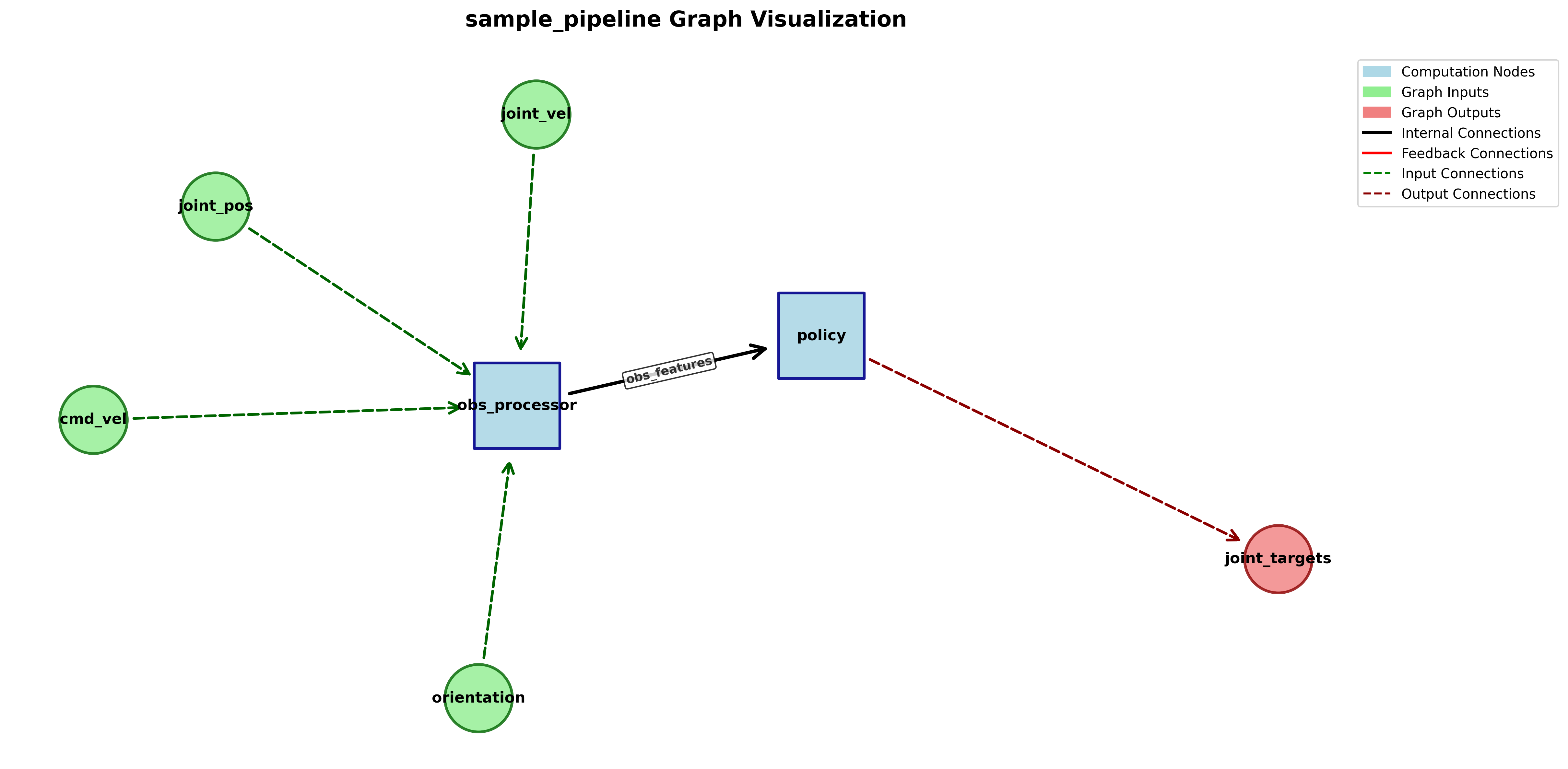
joint_pos, joint_vel, orientation, cmd_vel
                    |
                [control]
        normalize -> policy -> scale/clip
                    |
              joint_targets
Tracing lifecycle#
leapp.start(name="sample_pipeline")   # 1. start tracing

# ... your annotated pipeline ...     # 2. run annotated code

leapp.stop()                          # 3. stop tracing
leapp.compile_graph()                 # 4. compile and export
What LEAPP Produces#
After compile_graph() runs, LEAPP writes a directory containing deployable
artifacts and the metadata needed to wire them together.
control.onnx contains preprocessing, policy weights and inference,
and action processing. Other export formats include TorchScript and
ExportedProgram (.pt2).
A YAML graph description with node inputs, outputs, backends, tensor metadata, and graph connectivity.
Optional replay checks compare exported model outputs against the traced Python outputs.
Optional PNG diagrams make the traced pipeline easier to inspect and discuss.
Try it yourself#
In a repository checkout, run
python examples/getting_started.py; with a pip-only installation, save and run the code above instead.Open the generated
sample_pipeline/directory.Inspect the files to see your exported pipeline.
Graph visualization#
On Python 3.11+, LEAPP writes a PNG graph visualization showing exported nodes, graph inputs and outputs, and data-flow connections between nodes. Python 3.10 warns and skips this artifact. Use it to verify that LEAPP captured the external inputs and final outputs you intended.
Graph specification file#
LEAPP also generates a complete specification of the pipeline. More details in Understanding the Generated Configs:
pipeline:
  inputs:
    control: [joint_pos, joint_vel, orientation, cmd_vel]
  outputs:
    control: [joint_targets]
  data_flow: {}
  feedback_flow: {}
The complete YAML contains:
Complete node specifications with input/output tensor descriptions.
Shape and dtype information for all tensors.
Graph structure metadata ready for deployment systems.
Model paths and export backend settings.
Next steps#
Take a look at the Tensor Semantics Usage guide to learn how to add semantic metadata to your pipeline.
Learn graph annotation patterns in Node patterns and exported-model runtime details in Understanding the Generated Configs.
Add recurrent state and feedback with State capture and feedback.
Browse the full API reference.